Many businesses invest heavily in product configurators only to discover that customers abandon the process halfway through because the interface feels confusing, overwhelming, or too technical. That is where guided steps and descriptions become essential.
A well-designed product configurator should not only allow users to customize products, but also guide them smoothly from one decision to the next. When using a WordPress configurator builder, adding contextual guidance can reduce friction, improve completion rates, and create a more enjoyable user experience.
In this article, we will explore how steps and guided descriptions help users complete customizations, why they matter for conversion optimization, and how you can implement them effectively in the WP configurator builder.
Why user guidance matters in product configurators
Nowadays, customers expect intuitive digital experiences. Whether they are customizing furniture, apparel, vehicles, electronics, or industrial products, users want the process to feel simple and interactive.
However, configurators often involve multiple customization stages, pricing dependencies, conditional logic, visual selections and complex product combinations. Without guidance, users can become confused quickly.
Most common problems include:
- Not understanding what an option does
- Feeling overwhelmed by too many choices
- Abandoning the customization process
Guided experiences solve these issues by helping users progress confidently.
What are guided descriptions in WP Configurator Builder?

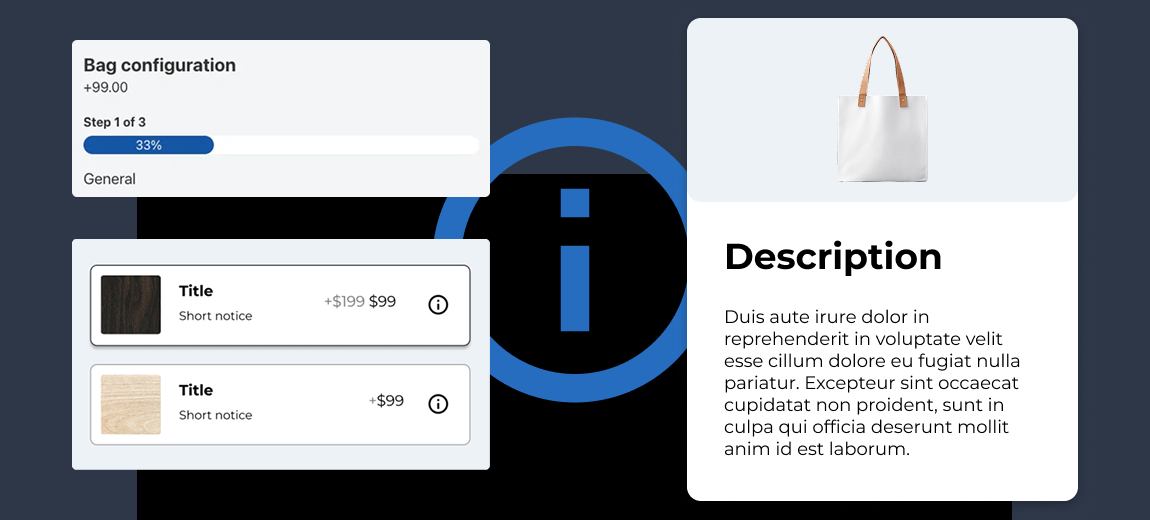
Guided descriptions are small pieces of helpful information that appear when users clicks or focuses on an info button. They reduce uncertainty without cluttering the interface. Instead of overwhelming users with large blocks of text, you can provide contextual guidance exactly where they need it.
In the WordPress configurator builder, tooltips are often used to explain specific options or attributes. For example:
- Product features
- Material differences
- Sizing information
- Technical specifications
- Compatibility warnings
- Color recommendations
- Configuration instructions
Benefits of descriptions for product customization

1. Reduced user confusion
Customers often hesitate when they do not understand an option.
For example:
- What does “anodized aluminum finish” mean?
- Which mounting option fits their setup?
- Why does one material cost more?
Description panels and tooltips provide immediate clarification.
This reduces decision fatigue and helps users continue customizing with confidence.
2. Improved conversion rates
The easier the customization process feels, the more likely users are to complete it.
When customers receive helpful guidance throughout the configuration journey, they experience less friction and are less likely to abandon the process.
Well-implemented descriptions can directly improve configuration completion rates like:
- Add-to-cart rates
- Lead submissions
- Quote requests
3. Better product understanding
Description panels and tooltips can educate customers about premium features and upgrades.
This is especially valuable for you selling:
- Technical products
- High-ticket items
- Modular systems
- B2B products
- Customized manufacturing solutions
Educated customers make better purchasing decisions.
4. Cleaner interface design
Without panel descriptions or tooltips, configurator pages often become crowded with instructional text.
Tooltips allow you to maintain a clean, modern interface while still providing important information.
This improves usability and visual appeal simultaneously.
What are guided steps in a product configurator?
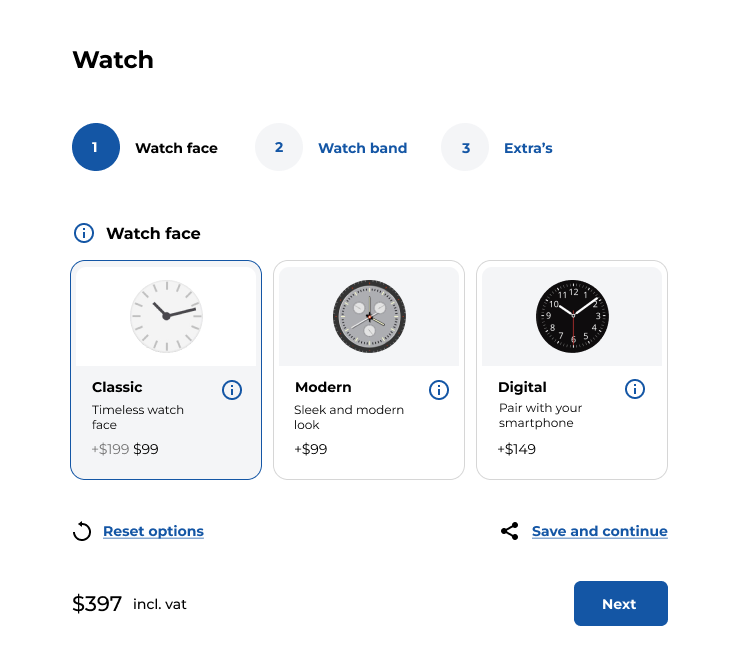
Guided steps organize the customization process into a structured sequence. Instead of displaying every option at once, the configurator walks users through the process step by step.
A typical guided steps configurator may look something like this:
- Select product model
- Choose dimensions
- Pick materials
- Select colors
- Add accessories
- Review pricing
- Finalize order
This structured workflow simplifies decision-making.
Why guided steps improve user experience
1. Simplifies complex configurations
Large product catalogs can overwhelm users.
Guided workflows break the process into manageable sections, helping customers focus on one decision at a time.
This improves usability dramatically.
2. Creates a sense of progress
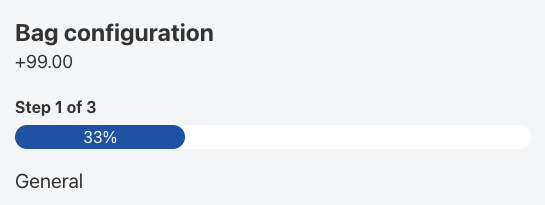
Progress indicators motivate users to continue.
When customers see that they are “Step 3 of 5,” they are more likely to finish the process.
This psychological effect improves completion rates significantly.
3. Improves mobile usability
Mobile users especially benefit from guided steps.
Displaying too many options on a small screen creates confusion.
Step-by-step flows make configurators far easier to navigate on smartphones and tablets.
4. Prevents invalid configurations
Many product customizations involve dependencies.
For example:
- Certain materials may only work with specific sizes
- Accessories may require compatible base models
- Color options may vary by product type
Guided (conditional) logic ensures users only see valid options.
This reduces configuration errors and customer frustration.
Best practices for descriptions in WP Configurator Builder
Keep the description content short
Descriptions and info boxes should deliver quick answers. Avoid long paragraphs at all cost.
Instead, use concise explanations in simply language and only focus on the key benefits and most important technical details.
Use visual aids when possible

Using images alongside the descriptions can improve understanding.
For example:
- Material close-ups
- Dimension diagrams
- Installation examples
- Color previews
Visual explanations often work better than text alone.
Trigger icons intuitively
Users should instantly recognize when additional information is available.
Common description button triggers include:
- Info icons
- Question marks
- Focus states on mobile
Ensure the interaction works well across desktop and mobile devices.
Avoid overusing tooltips
Too many tooltips create clutter and distraction. Only add guidance where users genuinely need help.
Prioritize technical decisions, high-impact options, confusing terminology and pricing-related choices
Best practices for guided steps
1. Use logical step sequences
The order of steps should match the user’s natural decision-making process. Poor sequencing increases confusion.
2. Include progress indicators
Users should always know where they are, how many steps remain and what will happen next. Progress bars improve completion rates and reduce uncertainty.
3. Allow easy navigation
Rigid workflows frustrate users, because they may want to revisit previous selections in a multi-step form.
A good product configurator should allow editing previous choices through backward navigation, reviewing selections, and making quick adjustments.
4. Allow user to save progress
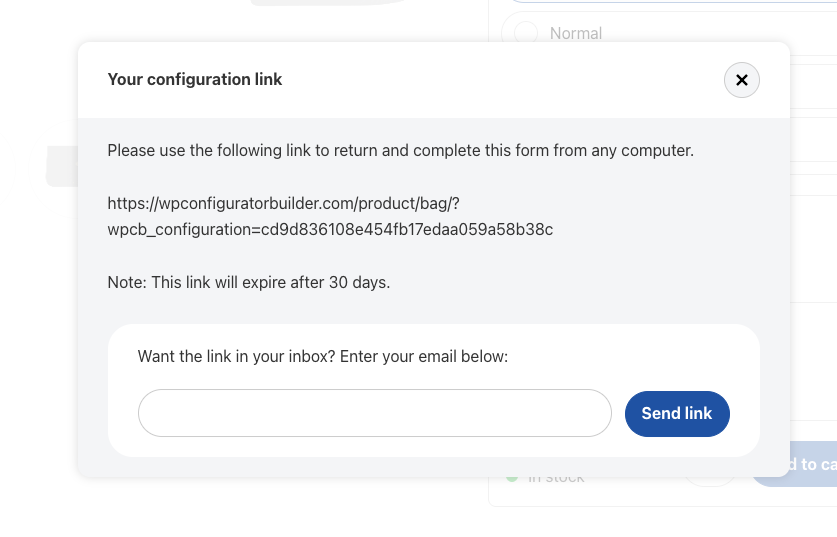
Long customization sessions may require time. Saving progress helps users continue later without restarting.
This is especially important for complex product configurations and high-value purchases
How descriptions and guided steps improve SEO
Many you overlook the SEO value of user experience improvements.
However, better configurator usability can positively impact search performance.
1. Lower bounce rates
Confusing experiences increase bounce rates.
Guided interfaces keep users engaged longer.
Search engines often interpret longer engagement as a positive quality signal.
2. Increased time on site
Interactive guided experiences encourage deeper exploration. Longer sessions can contribute to stronger engagement metrics.
3. Higher conversion signals
Search engines increasingly value user satisfaction. A smooth customization process improves:
- Engagement
- Conversion rates
- Return visits
- Brand trust
These factors support long-term SEO growth.
4. Better content relevance
Tooltip content can also enrich keyword relevance.
For example, explanatory text naturally includes:
- Product terminology
- Feature descriptions
- Material information
- Industry-specific keywords
This helps search engines better understand product pages.
Industries that benefit most from guided product configurators

1. Furniture customization
Furniture buyers often customize:
- Dimensions
- Fabrics
- Finishes
- Configurations
- Accessories
Guided workflows simplify large product catalogs while tooltips help explain materials and sizing.
2. Automotive customization
Vehicle configurators involve many dependencies. Guided steps prevent incompatible selections while improving the overall buying experience.
3. Apparel and fashion
Sizing assistance, fit guides, and fabric explanations reduce uncertainty and lower return rates.
4. Manufacturing and industrial products
Complex technical specifications require contextual explanations. Tooltips make industrial configurators far easier to use.
5. Electronics and technology
Compatibility guidance helps customers build systems confidently while avoiding configuration errors.
Features to look for in a WP Configurator Builder
Not all configurator solutions provide strong user guidance capabilities.
When selecting a WordPress configurator builder, you should prioritize features such as:
- Custom descriptions
- Conditional logic
- Step-by-step workflows
- Mobile optimization
- Progress indicators
- Dynamic pricing updates
- Real-time visual previews
- Saved configurations
- Responsive interface design
The right feature set improves both usability and scalability.
Common mistakes to avoid
- Overcomplicating the workflow
Too many steps can frustrate users. Keep the process streamlined whenever possible. - Hiding important information
Critical product details should not rely solely on tooltips. Users should still have access to comprehensive product information elsewhere on the page. - Ignoring mobile experience
Many users customize products on mobile devices. Tooltips and guided steps must function properly on touch screens. - Using technical language
Avoid jargon whenever possible. Simple explanations improve accessibility and customer confidence.
Final thoughts
Descriptions and guided steps are not just optional enhancements for product configurators. They are essential usability features that help customers complete customizations confidently and efficiently.
The best configurator experiences combine flexibility with clarity. When users understand every step of the customization journey, they are far more likely to complete purchases and return in the future.
As competition in WooCommerce continues to grow, companies that prioritize intuitive guided customization experiences will gain a significant advantage in both usability and conversions.
Thankfully, the WP Configurator Builder plugin offers guided descriptions with visual image support out-of-the-box. Get started for free today!