

What is a visual product configurator?
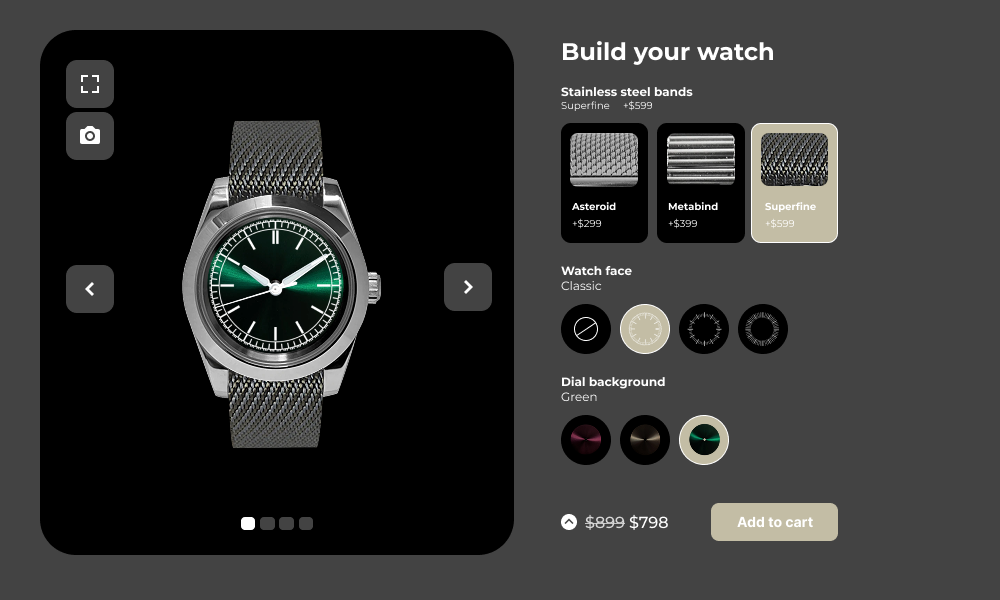
A visual product configurator for WooCommerce and WordPress empowers you to offer a highly interactive and personalized shopping experience, allowing customers to customize products in real-time before making a purchase.
Using intuitive, drag-and-drop features, customers can make real-time modifications to a product’s appearance, options, and features, all while visually seeing the changes reflected on the product image.
For example:
- Apparel stores: customers can choose a t-shirt design, select a color, and add custom text or graphics, seeing their choices in real-time.
- Furniture stores: buyers can customize furniture by selecting materials, colors, and sizes, instantly previewing how their changes impact the product.
- Tech gadgets: customers can select different hardware options, such as storage capacity, screen size, or colors for a smartphone or laptop.
These types of customizations help create a more immersive shopping experience, leading to greater customer satisfaction and higher conversion rates.
WCB has full support for visual customizations
A visual product configurator for WooCommerce and WordPress empowers you to offer a highly interactive and personalized shopping experience, allowing customers to customize products in real-time before making a purchase. The WP Configurator Builder has everything you need to start building visual product configurators in WordPress and WooCommerce.


WooCommerce professionals use WCB to save a lot of time

“Perfect templates, great features, fast and very powerful for a Woocommerce site”

Unlock the full power with WCB pro
Experience the full power of the WCB configurator builder plugin. Create multi step forms, apply conditional logic, and more
Why do you need a visual product configurator for WooCommerce?

A visual product configurator simplifies this process by visually showing customers how different options will affect the final product. Whether you’re selling configurable laptops, customized gifts, or complex furniture, a configurator helps simplify product choices, making it easier for customers to design their perfect item.

For example, a customer may choose a base product and then customize it with premium options that raise the price, encouraging them to spend more.

This not only improves your store’s user experience but also makes it more memorable to customers.
When customers can visualize their unique product, they are more likely to add it to their cart and complete the purchase, significantly improving conversion rates.

A visual product configurator ensures that customers are confident in their purchase, reducing the likelihood of returns and increasing repeat business.


Key features of a visual product configurator for WooCommerce and WordPress
Recommended add-ons



How to set up a visual product configurator on your WooCommerce store
Install the WCB configurator builder plugin
Select the WCB configurator builder plugin and install it on your WordPress site. You can easily install the plugin via the WordPress dashboard. Once the plugin is installed, you can start creating customizable products.
Create customizable products
Head over to WCB > Choices and add the different options or features you want customers to choose from, such as colors, materials, or additional accessories. Set the pricing for the options to reflect how each customization will impact the final cost.
Next, create a new configuration in WCB > Configurations and add all the choices to the configuration form.
Finally, configure the settings of your product configurator, such as the layout, design options, and product preview.
Launch and promote your configurable products
Once your visual product configurator is up and running, ensure that the user interface is intuitive and easy to navigate for your customers. Test the tool to make sure it works smoothly and integrates with your store’s checkout process.
Once you are satisfied with the result, promote your customizable products through your website, email campaigns, and social media channels. Highlight the customization options and encourage customers to engage with the tool to create their perfect product.
FAQ
Will the plugin work with my theme?
The plugin is optimized to work with all well-coded themes and page builders.
Are swatches mobile-friendly?
Absolutely! WCB Configurator Builder is responsive by design. You can control the amount of swatches per row for desktop, tablet and mobile.
Can I add text and images to the product image?
Absolutely! You can personalize the product image with text and images using the text visual controls. For image uploads you need our advanced fields add-on
Can I charge extra for custom text?
Absolutely. You can set a fixed or percentage-based price for the field.
Can I layer images for configurable products?
Yes! WCB Configurator Builder supports multi-layered images, ideal for building complex products like cars, bicycles, or furniture sets.
Can I switch from 2D to 3D later?
Absolutely. Many stores start with 2D and upgrade to 3D once they validate demand or get access to 3D assets.
Will a 3D configurator slow down my website?
Not necessarily. If your GLB files are optimized it should not affect your website performance. Tip: use compressed models under 10MB, and WCB ensures WebGL compatibility for smooth performance.
Do I need WCB Pro for image uploads?
Yes. File upload fields are available only in the Pro version of WCB Configurator Builder.
Can I restrict upload size or type?
Yes! You can define allowed file types and max upload size for each upload field.