Managing SKUs (Stock Keeping Units) efficiently is key to running a scalable WooCommerce store. But when your products include multiple selectable options, assigning a unique SKU to each variation or configuration can quickly become complex.
Fortunately, there are reliable methods to dynamically generate product SKUs based on selected options.
In this guide, we’ll walk you through how to set up SKU generation for option-based products using WooCommerce and WCB Configurator Builder, along with other plugin solutions.
Why SKU generation based on options matters
SKUs are more than just internal codes. They are essential for:
- Accurate inventory management
- Integrations with shipping and ERP systems
- Product identification and returns
If you’re selling configurable products (e.g., “T-shirt – Red – XL”), you need unique SKUs to track and fulfill each selection precisely.
Example use cases
- A furniture store offers a sofa in different fabrics and sizes.
- A clothing store sells custom t-shirts with size and color options.
- A hardware retailer lets customers configure kits with optional accessories.
Each combination should have a unique SKU, either predefined or dynamically generated.
Method 1: Generate SKUs based on selected options
WCB Configurator Builder is a powerful plugin for WooCommerce that allows dynamic product building with custom logic, including custom SKU generation based on selected options.
Prerequisites
- WCB Configurator Builder installed with inventory management add-on
Or WCB Configurator Builder Pro - WooCommerce plugin installed and active
Step 1: Create a WooCommerce product
- Navigate to Products > Add New
- Choose type Simple Product
- Add a title, featured image and price
- Save the product
Step 2: Define configurable options in WCB
- Head over to WCB > Choices
- Add a new Choice
- Enter a name (e.g., Size, Color)
- Add your customizable options
- For each option, define a SKU suffix like:
- Size: Small: S, Medium: M, Large: L
- Color: Red: RD, Blue: BL, Green: GR
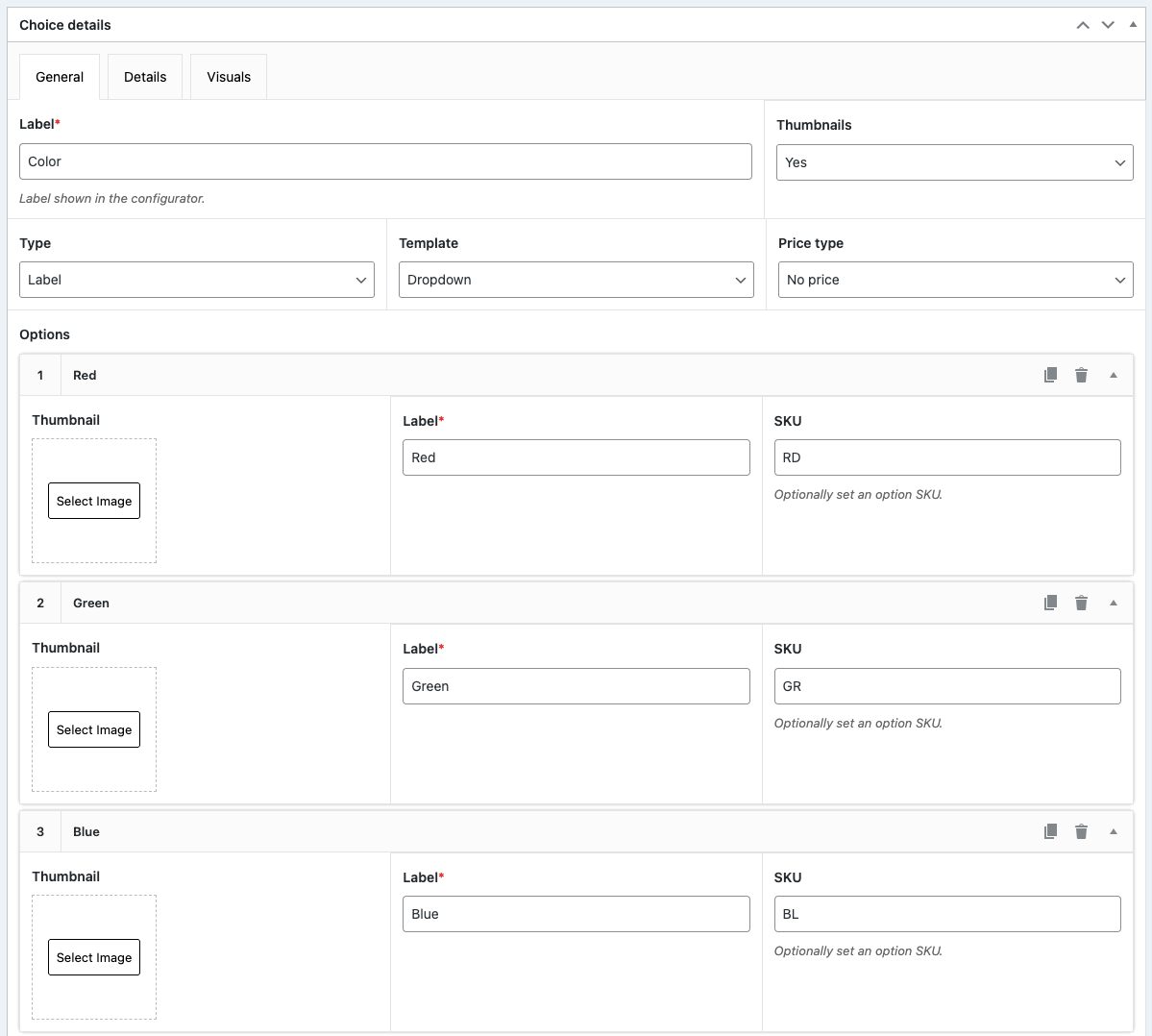
Step 3: Set dynamic SKU generation format
- Head over to WCB > Configurations and create a new configuration or select an existing configuration
- Add your customizable options to the configuration builder form
- Open up the “Product” tab in the Configuration data box (at the bottom)
- Here you can enter a base SKU format, such as TSHIRT-${12}-${33}, where “12” and “33” are the input IDs of the customizable configuration options
- WCB will then generate SKUs like:
- TSHIRT-S-RD
- TSHIRT-M-BL
- TSHIRT-L-GR

Step 4: Save and preview
- Save the product and preview it
- When a customer selects options, the SKU updates dynamically on the product page and in the cart
Method 2: Use WooCommerce product variations (manual)
If you’re not using WCB, WooCommerce allows SKUs on each variation:
- Set up your product as a Variable product
- Under the Variations tab, generate all combinations
- Assign unique SKUs manually to each variation
Downside: This method becomes unmanageable for products with many attributes (e.g., 5 colors × 5 sizes = 25 SKUs).
Best practices for SKU generation
- Keep SKU formats consistent: e.g., [ProductCode]-[ChoiceID1]-[ChoiceID2]
- Avoid special characters: stick to dashes, underscores, and uppercase letters
- Use meaningful codes: makes it easier for staff and customers to interpret
- Document your SKU structure: especially important for larger stores with fulfillment teams
Final thoughts
Generating SKUs based on selected options in WooCommerce can be a game-changer for inventory accuracy, order fulfillment, and automation.
Whether you use WCB Configurator Builder for dynamic generation or WooCommerce’s native variation system, having a clear SKU structure ensures a smoother experience for both store admins and customers.
FAQ
Can WooCommerce generate SKUs automatically?
Not by default. You need a plugin like WCB Configurator Builder or a dedicated SKU generator to auto-generate SKUs based on options.
Are dynamically generated SKUs visible to customers?
No, not by default. The custom generated SKU is stored in the product meta data. But you can display the SKU on the product page, cart, and emails if you like to
Can I use option-based SKUs with stock tracking?
Yes. If each option combination is tied to a unique SKU, it can also have independent stock levels.
You can choose to create single products in WooCommerce to track stock positions, or use an external inventory management system.