

What is a product customization plugin for WooCommerce?
A product customization plugin for WooCommerce allows you to enhance the user experience on your online store by adding customization options to your products.
This enables customers to personalize items according to their preferences before purchasing. Whether you’re selling t-shirts, mugs, jewelry, or even furniture.
The WCB configuration plugin allow you to seamlessly integrate product customization options into your WooCommerce store, ensuring customers can tailor their products with ease.
Product customizations can include:
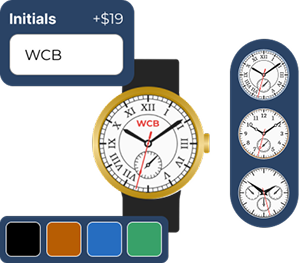
- Add custom text or messages (e.g., engraving names or messages).
- Upload images or logos for printing (ideal for personalized gifts or business merchandise).
- Choose colors, sizes, and materials for products (like apparel or furniture).
- Select custom options and features (e.g., engraving styles or packaging options).
- Customize designs in real-time through a visual interface (ideal for complex products like invitations or custom prints).
Key features of a product customization plugin for WooCommerce
When looking for the best product customization plugin for your WooCommerce store, certain features can make a significant difference in terms of functionality, user experience, and ease of use. Here are the key features you should look for:
Multiple customization options
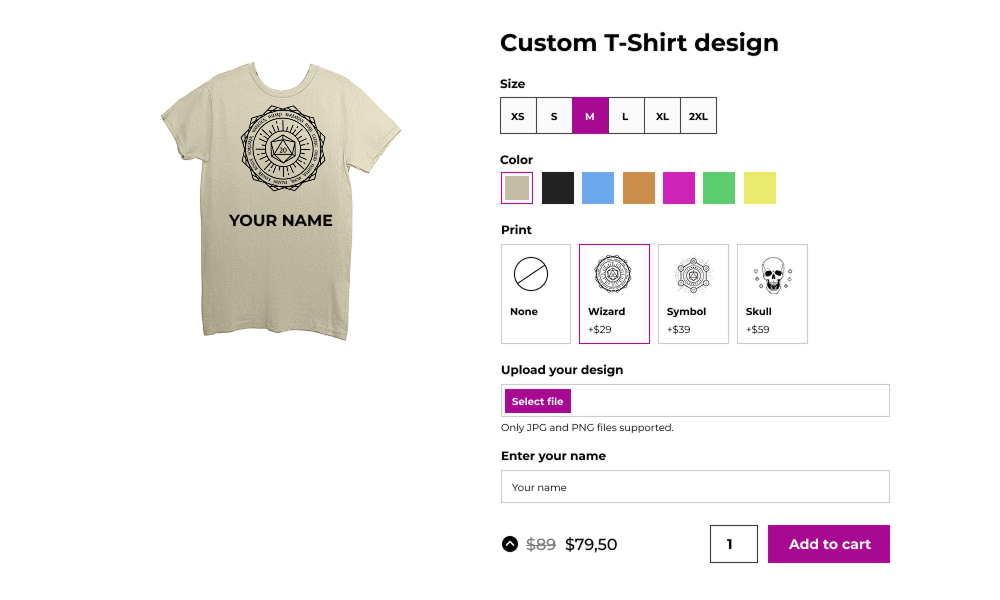
The WCB customization plugin offers a wide variety of options, including:
- Text fields for custom messages.
- Image upload functionality for logos, photos, or designs.
- Color pickers and size selectors.
- Dropdown menus or checkboxes for custom options (e.g., different materials or styles).
- Real-time price updates based on selected customizations.

3D or 2D product previews
For more complex products, such as apparel or printed merchandise, a plugin that offers 2D or 3D product previews can significantly enhance the shopping experience.
These interactive previews allow customers to visualize their customizations in a dynamic, engaging way, helping them make confident purchasing decisions.
Explore live image updates
Conditional logic
The ability to display or hide specific options based on the customer’s previous selections can greatly enhance the user experience.
For example, if a customer selects a certain material for a product, you can show them additional customization options that are relevant to that material.
This feature makes the customization process more intuitive and organized.
View add-on
Customizable pricing rules
Some customizations might come with additional costs, and a good plugin will allow you to set dynamic pricing rules based on the customer’s selections.
For example, you could charge more for engraving or for selecting premium materials. The plugin should update the price automatically when the customer selects customization options.
Explore
Seamless integration with WooCommerce
The WCB plugin integrates seamlessly with WooCommerce, ensuring compatibility with your existing products, checkout process, and payment gateways.
This ensures that all customer customizations are captured and reflected accurately in the cart and during checkout.
The plugin also work seamlessly with WooCommerce’s order management system, so you can keep track of all customized orders, production requirements, and delivery instructions.
WooCommerce professionals use WCB to save a lot of time

“Perfect templates, great features, fast and very powerful for a Woocommerce site”

Unlock the full power with WCB pro
Experience the full power of the WCB configurator builder plugin. Create multi step forms, apply conditional logic, and more


Why you need a product customization plugin for WooCommerce

By giving customers the freedom to customize their products, you offer something more than what your competitors provide.
Whether it’s custom t-shirts, bespoke gifts, or personalized gadgets, a customization option can help you cater to specific customer needs, giving you a competitive edge.

A product customization plugin makes it easy for customers to add extra options and features, thus increasing your store’s average order value (AOV).
For example, if you sell custom-made phone cases, offering options like different colors, designs, and engraving features could encourage customers to add more value to their cart, increasing your overall sales.

This high level of connection with your brand often leads to positive reviews and increased brand loyalty.
Customers will not only come back for more, but they will also share their experiences with others, helping you grow your customer base.

By offering product customization, you lower the risk of returns and exchanges, ultimately saving your business time and money.
Recommended add-ons





WCB has all you need to start your product customization journey
The WP Configurator Builder has everything you need to start building visual product customizers in WordPress and WooCommerce.


FAQ
Are swatches mobile-friendly?
Absolutely! WCB Configurator Builder is responsive by design. You can control the amount of swatches per row for desktop, tablet and mobile.
Can customers see a preview of their uploaded image on the product?
Yes, if you use WCB visuals feature, you can overlay the uploaded image on the product mockup.
Can I layer images for configurable products?
Yes! WCB Configurator Builder supports multi-layered images, ideal for building complex products like cars, bicycles, or furniture sets.
Can I add text and images to the product image?
Absolutely! You can personalize the product image with text and images using the text visual controls. For image uploads you need our advanced fields add-on
Can I mix color and image swatches in the same field?
No, you cannot use mix color swatches and images swatches in the same field. Each field should contain either color or images swatches.
Can I charge extra for custom text?
Absolutely. You can set a fixed or percentage-based price for the field.
Can I offer free add-ons alongside paid ones?
Absolutely! You can set the price of any add-on to zero. This is useful for promotional offers like “free gift wrap” or “free engraving” while still giving customers the choice to opt in.
Can I set minimum/maximum item selections?
Yes. You can control how many options users must or can select per group with our advanced fields add-on
Can I switch from 2D to 3D later?
Absolutely. Many stores start with 2D and upgrade to 3D once they validate demand or get access to 3D assets.
Do I need to know 3D modeling to use WCB Configurator Builder?
While you need to upload a GLB file, you don’t need to create one yourself. You can hire a designer or use existing 3D assets.
If you decide to create 3D models yourselves, you do need to have a basic understanding of 3D modeling, preferably in Blender.
Do I need WCB Pro for text fields?
No, text inputs is a free feature of the WCB Configurator Builder.
Do I need WCB Pro for image uploads?
Yes. File upload fields are available only in the Pro version of WCB Configurator Builder.
Does the visual drag controls work in 3D visual mode?
Yes, we also support drag and drop controls for 3D viewers. You can drag and resize the position on the 3D model around using controls in the configuration form.
Is WCB compatible with Elementor or Gutenberg?
Yes, WCB works with both. You can insert configurator products on any page or template. Or transform WooCommerce pages by linking the configuration to a WooCommerce product.
Will the plugin work with my theme?
The plugin is optimized to work with all well-coded themes and page builders.