

Definition of the product configurator
So what exactly is a product configurator for WordPress? In simple terms, it’s an interactive feature on your website that lets users build or customize a product in real time. Think of it like a digital version of a sales assistant. Instead of picking a generic item from a dropdown menu, your customers get to see how the product looks as they choose different colors, sizes, features, or components. It’s visual, dynamic, and incredibly engaging.
On WordPress, product configurators are most commonly built using plugins or integrations with platforms like WooCommerce. Depending on what you’re selling, the configurator can be as simple as a step-by-step form or as advanced as a full 3D model that updates live as customers make changes. For example, a custom t-shirt shop might offer a tool where customers upload designs, choose colors, and see the final result instantly. A furniture business might allow users to select materials, dimensions, and finishes, all from one streamlined interface.
What makes product configurators such a smart addition to a WordPress site is how they blend marketing and function. Customers love the control they get. It reduces hesitation and helps them feel confident about what they’re buying. And because everything is customized on the spot, they’re more likely to complete the purchase, meaning higher conversion rates for you.
From a business perspective, configurators help eliminate errors. You’re not dealing with vague emails or order notes anymore. The product configurator collects exactly what the customer wants, which gets passed directly into your order management system. If you’re using WooCommerce, many configurator plugins also connect with payment gateways, inventory tools, and even your shipping setup. This keeps everything smooth behind the scenes.
Of course, not all product configurators are created equal. The complexity of your configurator will depend on your product and how many options you offer. Simple form-based configurators work well for services or digital products. But if you’re in a market where visual impact matters, like fashion, furniture, or decor, a 2D or 3D configurator will go a long way. These often require more setup and performance optimization, but the payoff is worth it.
Now, before you dive in and install a plugin, it’s important to think about the user experience. How will your customers interact with the configurator? Does it load fast? Is it mobile-friendly? Does it integrate smoothly with your checkout process? A poor experience can turn users away, so it’s essential to choose a solution that feels native to your site and brand.
There are plenty of options available when it comes to product configurators for WordPress. Some are plug-and-play, while others may need a bit of custom development. Whichever route you take, the end goal is the same: to let your customers take part in creating the product they want, while giving you better data, fewer mistakes, and more sales.
In today’s eCommerce world, personalization isn’t just a trend, it’s an expectation. A product configurator helps you meet that expectation head-on, and when used right, it can become one of the most powerful conversion tools on your WordPress site.
If you’re serious about growing your store and offering a richer shopping experience, adding a product configurator is a step in the right direction.
Understanding the different product configurator types
Before diving deeper into the WordPress product configurator plugins, it’s important to understand the different types of product configurators available, especially as a WordPress or WooCommerce store owner. The kind of configurator you choose should depend on your product, your customers, and the level of complexity you want to offer.
Product configurators come in various styles, each designed to handle different use cases. Some are simple and text-based, while others offer highly visual, interactive experiences. If you’re thinking about adding one to your WordPress store, here’s a breakdown of the main types you should know.

1. Guided selling product configurators
Guided selling configurators are essentially interactive forms that walk customers through a decision-making process. These are perfect for non-technical users or shoppers who may not know exactly what they need when they land on your site.
Instead of asking them to pick from a dozen complex options, a guided configurator breaks it down into simple questions:
“What’s your use case?” > “What’s your budget?” > “Do you prefer feature A or B?”
Based on their answers, the configurator narrows down the choices and recommends the best product or a pre-configured version of it.
For WordPress users, guided selling can be built using advanced form builders like Gravity Forms, Formidable Forms, or specialized WooCommerce product builders like WCB configurator builder. It’s especially useful for stores offering services, bundles, or B2B solutions, where buyers need help understanding what’s best for them.
Learn more
2. Visual or layered product configurators
This is the classic product customizer, where customers can see their product change as they select different features, colors, or add-ons. These usually use stacked images (layers) or visual swaps to give real-time previews.
A layered configurator is ideal for products with physical variations: things like bikes, shoes, furniture, or tech accessories. Instead of imagining what a “black frame” looks like, customers see it change on screen.
Plugins like WCB Configurator Builder are built for exactly this kind of use case in WordPress. It’s simple, visual, and effective, without the need for 3D modeling or code.
Learn more
3. Composite product configurators
Composite configurators are used when a product is built from several interdependent components. It’s not just about selecting features, each step of the configuration process might affect the next one.
Imagine you’re building a custom PC. You choose a motherboard, and based on that choice, only compatible CPUs are shown. Then you pick RAM, storage, graphics cards, all in a specific order, where each decision narrows down the valid options for the next.
This is more complex than a visual configurator. It requires logic, compatibility rules, and sometimes real-time inventory checks.
In WooCommerce, this type of setup is often built using the Product Bundles, Composite Products, or Mix and Match plugins. These plugins let you create structured, multi-step builders with conditional logic and linked components.
Learn more
4. CPQ product configurators (Configure, Price, Quote)
CPQ configurators are advanced tools usually used in B2B or enterprise-level sales environments. CPQ stands for Configure, Price, Quote, and it does exactly that:
- Configure: Choose complex product specs, often involving compatibility rules.
- Price: Calculate dynamic pricing based on selections, quantities, discounts, or customer type.
- Quote: Generate a custom quote or proposal automatically.
This type of configurator is common in industries like manufacturing, SaaS, and tech equipment, where pricing isn’t fixed and products can’t be purchased “off the shelf.”
While not native to WordPress, CPQ systems can be integrated using API-based solutions or external platforms like Salesforce CPQ, DealHub, or Tacton. For smaller-scale needs, WordPress users sometimes replicate CPQ behavior using a combination of dynamic pricing plugins, quote request forms, and conditional logic builders.
Learn more
5. Text-based and form-based product configurators
These are the most basic type of configurator, often just a smartly structured form. Customers select options from dropdowns or checkboxes, maybe upload a file, and hit Add to Cart. There’s no dynamic preview, but it works well for service-based businesses or digital goods.
A freelancer selling logo design packages might let customers choose turnaround time, number of revisions, and upload reference files, all through a form-based product page.
This type is easy to set up in WordPress using standard WooCommerce variable products or simple form plugins with product field integrations.
Learn more
6. 3D and AR product configurators
3D configurators offer full model manipulation, rotate, zoom, view from every angle. AR (Augmented Reality) configurators take it even further by letting users place the product in their environment using their phone camera.
While these are impressive and immersive, they’re usually overkill unless you’re selling high-end products like cars, luxury furniture, or equipment that customers want to visualize in their space.
For WordPress users, implementing 3D/AR often involves integrating external tools like Threekit, Sketchfab, or custom WebGL-based solutions. Some are beginning to support WooCommerce directly, but they usually require professional setup and hosting.
Learn morePopular features of product configurators
Product configurators have become essential tools for online stores, particularly those offering customizable or complex products. Whether you sell furniture, apparel, electronics, or industrial equipment, the right configurator can transform your customer’s buying journey from confusing to engaging, and ultimately increase conversions.
But what features should you expect or prioritize when choosing a product configurator plugin? Below, we’ll explore the most popular and valuable features that help make product configurators so effective.
Real-time visual previews
One of the most compelling features of modern product configurators is the ability to show customers exactly what they’re creating in real time. This could be a 2D layered image, a 3D model, or even an augmented reality (AR) preview.
Real-time previews reduce uncertainty, help customers make better decisions, and build confidence that the product they order matches their expectations.
Continue readingLayered customization
Many configurators use a layering system, where customers can build their product step-by-step by adding or changing individual components. For example, when configuring a sofa, a customer might choose the frame, then add cushions, select fabric, and finally pick a leg style.
This layered approach helps break down complex products into manageable choices and ensures that every option is visually represented.
Guided selling and conditional logic
Not all customers want to explore every option on their own. Guided selling features help by asking questions, suggesting options, or hiding incompatible choices using conditional logic.
For instance, if a customer chooses a specific engine size for a bike, the configurator might automatically limit accessory choices that don’t fit. This reduces frustration and streamlines the decision-making process.
Conditional displayDynamic pricing updates
Customization often changes the price. A configurator that updates pricing in real time as customers select options helps prevent surprises at checkout and encourages upselling.
Whether it’s adding premium materials, extended warranties, or bundled products, seeing the cost change dynamically keeps customers informed and engaged.
Live price updatesText personalization and upload options
Many product configurators let customers personalize products with custom text, initials, or uploaded images. This is especially popular in industries like fashion, print-on-demand, and gifts.
A good configurator provides intuitive tools to add, position, and style text or images, often with live previews.
Text input visualsMobile responsiveness
With mobile shopping continuing to grow, product configurators must work seamlessly on smartphones and tablets. Responsive design ensures the customization experience is smooth regardless of screen size, preserving usability and engagement.
Integration with WooCommerce (and other plugins)
For WordPress users, seamless integration with WooCommerce is critical. Configurators should sync product options, SKUs, stock management, and pricing with your existing store setup.
Some advanced plugins also integrate with CRM, ERP, or quoting systems, especially important for B2B sellers using CPQ (Configure, Price, Quote) workflows.
For WooCommerceMulti-language and multi-currency support
If you sell internationally, configurators that support multiple languages and currencies help deliver a localized shopping experience, which boosts customer trust and satisfaction.
Read moreSave and share configurations
Allowing customers to save their configurations or share them via link or email is a great way to facilitate decision-making, especially for higher-ticket or collaborative purchases.
This feature also helps sales teams follow up and provide quotes based on the customer’s custom selections.
Save and continueEasy-to-use admin interface
Behind the scenes, configurators should provide store owners with a simple way to set up products, define options, and manage rules without complex coding.
User-friendly admin interfaces accelerate setup and make ongoing updates easier, allowing your store to stay agile and responsive to market trends.
Analytics and reporting
Advanced configurators often come with analytics tools to track which options are most popular, where customers drop off, and how configurator usage impacts sales.
This data helps merchants optimize product offerings and configuration flows for better performance.
Social sharing
Allowing customers to share their custom designs on social media platforms helps spread the word and attract more traffic to your store.
Compatibility checks
Advanced configurators automatically ensure that selected options are compatible with each other. This prevents customers from choosing invalid combinations, for example, an incompatible motherboard and CPU in a custom PC build.
Inventory and stock management
Some configurators integrate directly with inventory systems to show real-time stock availability for configurable options. This helps avoid selling products or components that are out of stock.
Manage inventoryMulti-step configuration process
To avoid overwhelming customers, configurators often break the process into several easy steps. This “wizard-style” flow guides users through choosing options one at a time, improving usability.
Multi-step formsBeyond simple price adjustments, configurators can include complex pricing rules, such as volume discounts, bundle pricing, or promotional offers triggered by specific selections.
Especially in B2B scenarios, configurators can generate formal quotes based on selected options and route them through an approval workflow involving sales teams and clients.
Configurators often automatically generate unique SKUs or product variants based on customer selections, simplifying order processing and fulfillment.
Many configurators allow full customization of the interface, from colors and fonts to layout and button styles, so the configuration experience matches the store’s branding.
Customers appreciate being able to easily undo or redo changes during configuration or reset the product back to default settings without starting over.
Some configurators allow customers to preview their product in different environments or angles, like seeing a piece of furniture in a room setting or a watch on a wrist
Ensuring the configurator is usable by people with disabilities (e.g., keyboard navigation, screen reader support) helps broaden your customer base and comply with regulations.
Developer-focused configurators may support custom scripting or API integration, allowing highly specialized or automated configuration logic.
Benefits of product configurators
Full range of benefits that product configurators can offer, especially for WordPress and WooCommerce users.
While the visual appeal often gets the spotlight, the real value of a product configurator goes far beyond just looking good on your product page. It impacts everything from customer experience and marketing, to operations, pricing, and even inventory management.
Here’s a comprehensive breakdown of the benefits:
1. Enhanced customer experience
At the core of a product configurator is personalization, and customers love that. Instead of browsing static product pages or guessing what different options might look like, they get a hands-on, interactive experience. It feels more like building than shopping:
- See changes in real-time (get immediate visual feedback)
- Explore combinations at their own pace
- Feel ownership of the final product
This reduces friction in the buying process and makes customers feel more confident, informed, and engaged.
2. Increased conversions and sales
A configurator doesn’t just entertain, it sells. When users can interact with a product, see how it looks, and tailor it to their needs, they’re far more likely to commit to the purchase. In many cases, stores report:
- Higher conversion rates
- Larger average order values
- Reduced cart abandonment
This is especially true when the configurator offers upsell opportunities, like premium materials or optional add-ons.
3. Reduced returns and refunds
Returns are often caused by unmet expectations. When customers buy something that looked one way in a photo but arrived differently in real life, they send it back.
Product configurators solve this by:
- Showing exactly what the customer is getting
- Making configuration choices more deliberate
- Reducing miscommunication on custom orders
As a result, you’re likely to see fewer returns, refunds, and customer service headaches.
4. Streamlined sales process
For B2B stores or businesses with more complex products, configurators act as a digital sales assistant. They guide the customer through the process step by step, making sure only valid combinations are selected.
Benefits of product configurators as your “sales assistant”:
- Allows customers to self-serve complex configurations
- Eliminates back-and-forth communications (reduces pressure on your sales team)
If you offer quotes (like in CPQ systems), the configurator can auto-generate a tailored proposal, further reducing manual work.
5. Simplified product management
Instead of creating dozens or hundreds of product variations manually, a configurator lets you dynamically generate variations using a rules-based system.
You don’t need a separate product for every color, size, or option. This:
- Keeps your product catalog clean
- Reduces clutter in your admin dashboard
- Makes inventory easier to manage
WCB even lets you link options to actual WooCommerce variations or inventory, so you can still track stock for components without bloating your store.
6. Improved pricing flexibility
Many configurators support dynamic pricing. That means the total price updates live as customers choose features, add-ons, or upgrades. This opens the door for:
- Transparent pricing (no surprises at checkout)
- Tiered pricing based on quantity or configuration
- Optional services (like engraving, rush shipping, gift wrapping)
Dynamic pricing helps you upsell without pressure, users can see the value add as they build their product.
7. Better data for marketing and product development
Every configuration completed on your site gives you rich data about customer preferences:
- Which colors or styles are most popular?
- What combinations are selected together?
- Which features are skipped or ignored?
This data helps you improve your product offerings. You also learn more about your customer’s needs, which improves everything from email targeting to retargeting ads.
8. Boosted brand perception and differentiation
Offering customization makes your store look more premium and forward-thinking. It’s also a way to offer value beyond the physical product; by creating an experience for the customer. This especially matters in industries like:
- Fashion and accessories
- Furniture and home decor
- Sporting goods
- Electronics
- Corporate gifting or branded merchandise
9. Scalability for complex or custom products
As your product line grows, managing individual SKUs and options can get overwhelming. A good configurator scales with your business by:
- Handling unlimited combinations through logic and rules
- Supporting modular product structures
- Allowing you to launch new options quickly
This is a huge time-saver for stores with complex offerings or frequently changing inventories.
10. Integration with business systems
Advanced configurators (especially CPQ or composite ones) can integrate with:
- ERP systems for inventory and order fulfillment
- CRM tools to capture leads or quote requests
- Shipping plugins for real-time costs
- Email marketing tools to follow up with saved configurations
This makes the configurator not just a front-end tool, but a key part of your operational workflow.
11. Mobile-friendly shopping
Many modern configurator plugins (like WCB) are built to be responsive and work beautifully on mobile. Since mobile shopping continues to rise, having a configurator that works well on phones and tablets improves your reach and user engagement significantly.
12. Shorter learning curve for sales teams
If your products are complex, training new sales reps can be time-consuming. A configurator acts as a training tool, guiding them through the same flow customers use. This helps teams understand features, combinations, and pricing logic faster.
Common downsides and pitfalls of product configurators
While product configurators can offer major benefits for both customers and businesses, they’re not without challenges. In fact, many store owners underestimate the cost, complexity, and long-term maintenance required to do configurators well.
Here’s a comprehensive list of downsides and potential pitfalls to consider before implementing a product configurator on your WordPress or WooCommerce store:
1. Higher setup time and cost
Building a product configurator isn’t always plug-and-play, especially if your products are complex or highly visual. Even with powerful plugins like WCB Configurator Builder, you still need to:
- Design and prep all image layers or assets
- Structure product logic and option relationships
- Set up pricing rules
- Test everything thoroughly across devices
If you’re working with 3D models or custom logic, the setup time (and cost) goes up significantly.
2. Complexity in maintenance
Once it’s live, a configurator becomes another system you need to maintain. Any time you:
- Change an option
- Change product pricing
- Update visuals
…you have to make sure the configurator still works. Keeping everything in sync with your product catalog, pricing, inventory, and marketing pages can be time-consuming, especially for larger stores.
3. Risk of performance issues
Configurators can slow down your site if they’re not optimized. This is especially true for:
- High-resolution images in layered or 3D configurators
- Plugins that don’t cache well
- Unoptimized scripts loading on mobile
A slow-loading configurator can frustrate users and hurt conversions, which defeats the whole point.
4. Not ideal for all products
Not every product needs a configurator, and not every customer wants one.
If your product is simple or standardized, adding a configurator can overcomplicate the experience. Forcing customization where it’s not needed may confuse users or create friction where none existed before.
Also, if your audience is less tech-savvy, they may prefer a straightforward “pick and buy” model.
5. Requires clean product logic
Configurators depend on clear, structured product logic. That means:
- Defining which options are compatible
- Preventing invalid combinations
- Making sure selections don’t contradict each other
If your product has fuzzy boundaries or too many edge cases, managing this logic can become messy. Without strong product data and rules, your configurator could offer impossible or broken combinations, leading to frustrated customers and fulfillment issues.
6. Can be overwhelming to users
More options aren’t always better. If you throw 10+ steps or dozens of choices at your users, they may get overwhelmed and abandon the process.
Poor UX design in configurators can cause:
- Decision fatigue
- Confusion about what’s required
- Unclear call-to-actions
- Missed options or errors in configuration
Good configurators need smart UX, clear steps, defaults, tooltips, and validation.
7. Plugin compatibility issues
On WordPress and WooCommerce, adding a configurator plugin can sometimes lead to:
- Theme conflicts
- Breaks with page builders (like Elementor or WPBakery)
- Issues with caching or speed optimization plugins
- Poor integration with third-party tools (analytics, CRM, etc.)
Since many configurator plugins are complex, they’re more likely to run into compatibility issues than simpler WooCommerce extensions.
8. Limited by plugin capabilities
Some configurator plugins have limited flexibility:
- Can’t do conditional logic between options
- No support for dynamic pricing or tax rules
- Lack of integration with inventory or shipping tools
- No ability to save configurations for later
If you outgrow your plugin, migrating to another tool (especially a custom one) can be a major project.
9. Difficult to track analytics
Measuring performance and behavior in a configurator is harder than tracking simple product pages.
You might struggle to:
- Track how users interact with each option
- Understand where they drop off
- Attribute conversion rates to configurator engagement
- Analyze which combinations perform best
You’ll likely need custom event tracking or Google Tag Manager setups to get meaningful data.
10. May not scale well for very large catalogs
If you sell hundreds or thousands of customizable items, managing configurators at scale can be overwhelming. Creating a visual configurator for every product, or duplicating logic across many SKUs, doesn’t scale easily.
This often leads to:
- Repetitive setup work
- Version control headaches
- Performance issues from bloated pages
In these cases, you may need a centralized product logic engine, which adds even more complexity.
11. Doesn’t replace good product marketing
A configurator alone won’t sell your product. You still need:
- Clear product benefits
- Strong visuals
- Customer reviews
- Well-written descriptions
- Email marketing and ads
If you rely too heavily on the configurator to do the selling, your other content may suffer, which weakens the overall sales funnel.
12. Steeper learning curve for admins
If you have staff managing your products, they’ll need to learn how the configurator works. That includes:
- Understanding the plugin interface
- Uploading layers correctly
- Managing conditional logic
- Troubleshooting errors
Without proper documentation or training, even simple tasks can become frustrating.
The best industries to use a product configurator
Product configurators have evolved from niche tools into mainstream eCommerce assets, especially for businesses offering customizable, complex, or high-value products. While not every industry needs one, certain sectors thrive when buyers are empowered to tailor products to their exact needs.

Furniture and home decor
Few industries benefit more from visual configuration than furniture and home decor. Shoppers often want to customize details like fabric, color, size, leg finish, and even the overall structure of an item, whether it’s a sofa, table, or modular shelving system. Since these purchases are high-ticket and heavily aesthetic, allowing customers to preview their choices builds trust and minimizes uncertainty.
Many furniture brands now incorporate real-time previews, 2D image layering, or even 3D and AR tools to help buyers visualize their space. For WooCommerce users, layered configurators like WCB Configurator Builder are an ideal starting point, especially for 2D views of products in multiple styles.

Fashion and apparel
Customization has become a key differentiator in the fashion world. From made-to-order sneakers to personalized hoodies and tailored suits, customers increasingly expect to control how their clothing looks and feels. Product customizers make this process intuitive by letting users mix and match colors, add embroidery, or select fit and finish options, all while seeing the changes in real time.
Beyond aesthetics, configurators can also guide users to the right size or product based on preferences and body type, creating a more personalized shopping experience.

Automotive and bikes
The automotive world pioneered digital configuration, long before it became common in eCommerce. Today, even smaller brands and bike shops can offer similar tools for their customers. Whether selling custom e-bikes, motorcycles, or performance car parts, configurators make it easy for buyers to explore options like paint, performance upgrades, accessories, and trims.
This is especially powerful for niche vehicle brands or WooCommerce sellers looking to replicate the “build your vehicle” experience on a smaller scale.

Sporting goods and outdoor equipment
In the world of outdoor gear, one-size-fits-all rarely works. Enthusiasts want performance items that are tailored to their needs, whether it’s a golf club set, hiking backpack, snowboard, or kayak. Configurators in this space help users choose the right size, materials, features, and add-ons, often with a clear visual output or multi-step form.
Customization not only improves the product fit but also strengthens brand loyalty by giving customers the sense that they’re buying something truly built for them.

Tech and electronics
From building a custom gaming PC to selecting a home security system, electronic products are often modular by nature, and product configurators are the best way to handle that complexity. Users can select storage, RAM, GPU, screen size, and more while receiving real-time updates to pricing and compatibility.
In B2B or professional settings, these configurators often follow a CPQ (Configure, Price, Quote) model, which ensures that only valid combinations are allowed, and that pricing reflects volume, service plans, or licensing terms.

Jewelry and accessories
The jewelry industry thrives on uniqueness. Configurators allow buyers to personalize every detail, from choosing gemstones and metals to engraving and packaging. For engagement rings or personalized gifts, the ability to preview the final product builds confidence and emotional connection.
Visual configurators are especially valuable in this space, where small design details make a big difference.

Print-on-demand and custom gifts
Whether it’s a mug with a photo, a custom phone case, or a personalized calendar, print-on-demand businesses rely heavily on configurators. Customers want to upload images, add text, choose colors, and preview the finished product before committing to the order.
With the rise of personalized gifts and drop shipping, configurators in this category are now essential tools for scaling operations without sacrificing uniqueness.

Industrial equipment and manufacturing (B2B)
Not all configurators are visual. In manufacturing and industrial sectors, configurators often work behind the scenes, using rules and dependencies to generate valid product configurations and quotes.
These CPQ-style configurators help sales teams and customers navigate complex product systems, such as custom machinery, HVAC units, or modular packaging lines, ensuring that every quote reflects the correct parts, pricing, and specifications. This reduces costly errors and shortens the sales cycle.

Food and beverage
Surprisingly, the food industry is starting to embrace configuration, especially in premium, health-focused, or subscription-based models. Think custom meal kits, snack boxes, build-your-own coffee blends, or nutrition plans tailored to dietary needs.
Configurators here often use a guided selling flow or dynamic ingredient selection tool to let customers fine-tune their experience while still maintaining backend efficiency.

Cosmetics and personal care
Beauty is personal, and configurators are helping brands tap into that. Customers can now build personalized skincare routines, design their own lipstick shades, or customize fragrances. These tools not only improve product relevance but also create a sense of luxury and exclusivity.
Configurators in cosmetics often blend visual previews with guided selling, helping users find the best match for their skin tone, hair type, or scent preference.

Educational and digital products
Product configurators aren’t just for physical goods. In the education and training space, they can be used to help users build custom course bundles, choose learning formats (e.g., video, live sessions, or PDFs), or add optional coaching sessions.
For digital product sellers on WordPress, this opens the door to personalization and bundling without needing a separate LMS or platform.

Promotional products and corporate gifting
Customization is the cornerstone of promotional products. Whether you’re selling branded pens, notebooks, T-shirts, or swag kits, configurators make it easy for clients to upload logos, select print locations, and see previews before ordering.
In this industry, configurators speed up approvals and reduce back-and-forth with sales reps, critical in time-sensitive corporate orders.
Product configurator plugin – WCB Configurator Builder
If you’re running a WooCommerce store on WordPress and looking to add product customization, WCB Configurator Builder is one of the best tools you can use. It’s designed to be flexible, user-friendly, and deeply integrated with the WordPress ecosystem, which makes it ideal for both beginners and more advanced users.
Easy to use
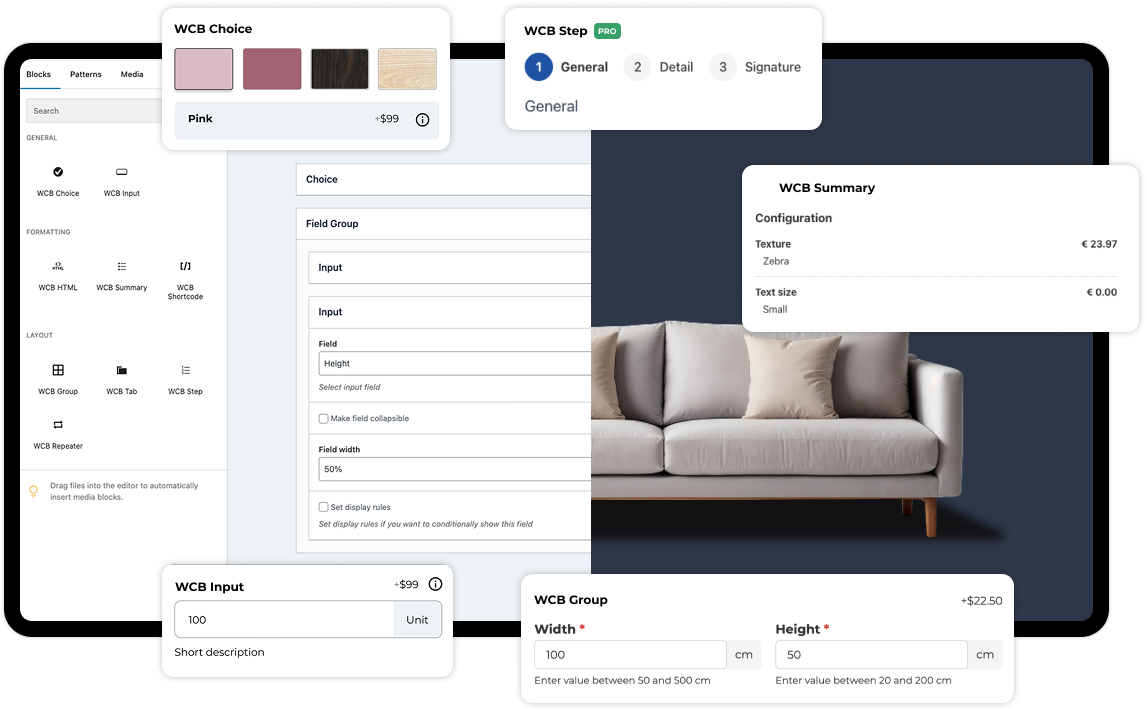
What makes WCB stand out is how easily it transforms any standard WooCommerce product into a customizable experience. You don’t need to touch code or hire a developer to start building. Right from your WordPress dashboard, you can use WCB’s drag-and-drop interface to create layered configurators where users can interact with different product options, like colors, textures, accessories, or other features.
Stackable image layers
One of the highlights of WCB is its layer-based approach. Each layer can represent a different part or option of the product. For example, let’s say you’re selling custom bikes. One layer could be the frame, another the tires, another the seat, and so on. Each layer has its own set of options and visuals. As the user makes a selection, the preview updates in real time, showing exactly what the final product will look like.
Swatches fields
WCB also supports image-based and color-based selections. That means your customers can choose a color swatch or click on thumbnail images to make their selections. If your product has a lot of visual components, like apparel, tech gear, or home decor, this feature becomes extremely useful. It’s not just functional, it’s visually appealing, which leads to a more engaging experience.
WooCommerce integration
Another big win for store owners is how WCB integrates directly with WooCommerce. Once a customer configures a product and adds it to the cart, all the selected options are saved with the order. This ensures you get the exact specifications without having to go back and forth with the customer. Plus, it supports dynamic pricing, so the total cost updates automatically based on the user’s selections.
Optimized for speed
Performance-wise, WCB is built to be lightweight. This is especially important if you’re running a storefront with a lot of traffic or high-resolution visuals. Nobody wants a slow-loading configurator, and WCB is optimized to deliver speed without compromising on features.
Page builder and block theme support
Now, if you’re worried about compatibility, don’t be. WCB works with most modern WordPress themes and plays well with essential plugins like page builders, SEO tools, and caching systems. This makes it easier to integrate into your existing site without breaking things.
Summary
Perhaps the best part is that WCB doesn’t lock you into a rigid system. Whether you’re offering simple two-option choices or highly complex, multi-step configurations, the builder adapts to your needs. You can start small, maybe just letting customers choose colors, and scale up as your product line grows.
To sum it up, WCB Configurator Builder offers the perfect mix of power, simplicity, and flexibility for WordPress users who want to bring real product personalization to their WooCommerce stores. If you’re ready to create a more immersive shopping experience and give customers the customization they crave, WCB is definitely worth exploring.
Getting started with WCB Configurator Builder
First things first: WCB Configurator Builder is a WordPress plugin designed to let you build fully visual, multi-layered product configurators that integrate directly with WooCommerce. It works by letting you stack transparent PNGs or images as layers, so when a customer selects an option, like a new color or feature, that layer is swapped in, and the product preview updates instantly.
No coding. No complicated setup. Just drag, drop, and customize.

Step 1: Install and activate the plugin
Start by going to your WordPress dashboard. Navigate to Plugins → Add New. You can search for WCB Configurator Builder if it’s available in the repository, or upload it manually.
Once it’s installed, click Activate.
After activation, a new “WCB Configurator” tab will appear in your WordPress admin menu.

Step 2: Prepare your product layers
Before you start building, you’ll need your product images ready. Each layer should be a transparent PNG file or a high-quality image that fits perfectly on top of the others.
Let’s say you’re configuring a bike:
- One layer is the bike frame
- Another is the wheels
- Another is the seat
- Each component should have alternate versions (e.g., blue frame, red frame, black frame)
Name your files clearly, and try to keep them at the same size/dimensions for a smooth visual result.
Step 3: Create a new configurator
Go to WCB Configurator > Add New Configurator.
You’ll be asked to give your configurator a title and assign it to a WooCommerce product. You can either link it to an existing product or create a new one.
Alternatively you can choose to display the configurator using a shortcode.

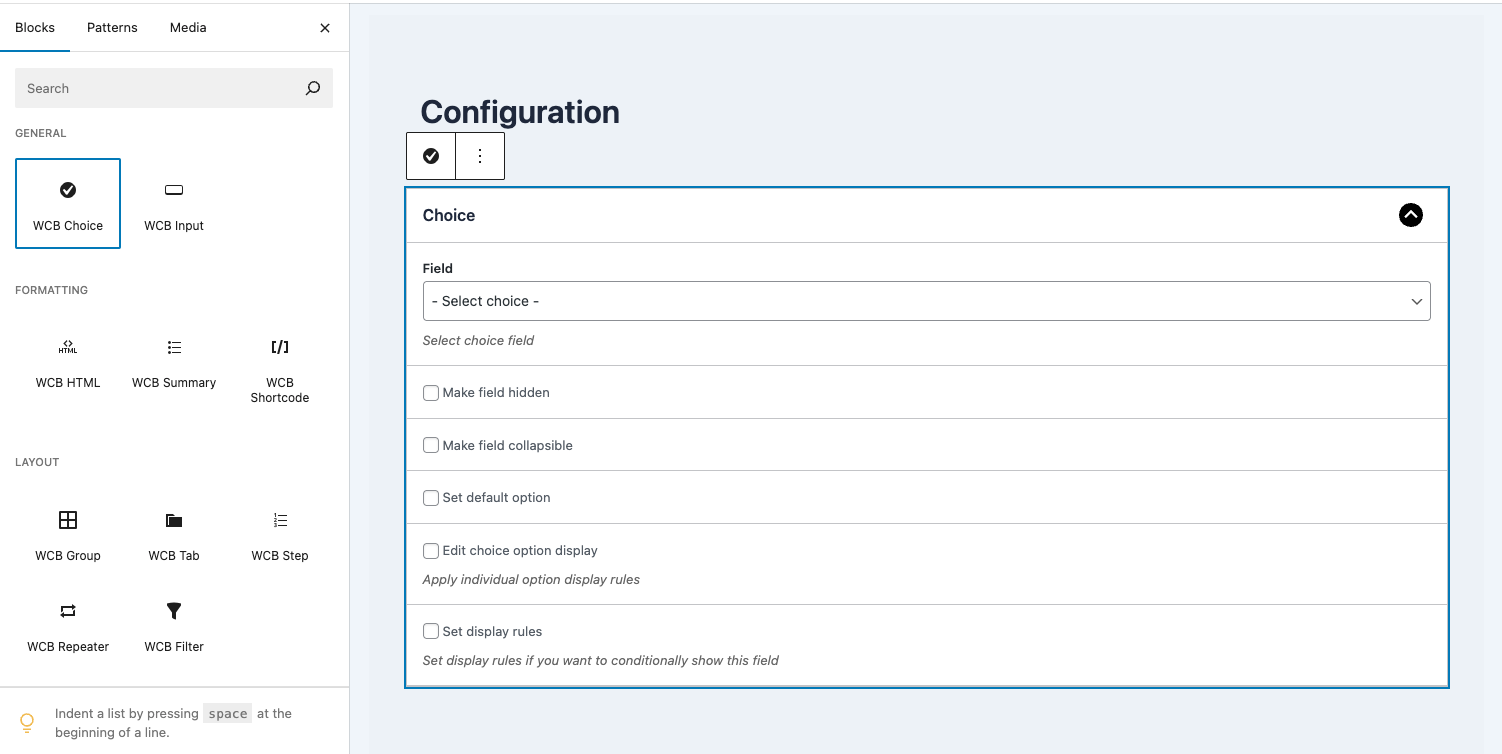
Step 4: Create options
With our configuration in place, we will start creating the choices, each one representing a part of the product. For each choice, you’ll define:
- A label (e.g., “Choose your frame”)
- The choice options (e.g., Blue, Red, Matte Black)
- Optional price adjustments for upgrades
Repeat this for each part of your product.

Step 5: Customize configuration options
On the configuration page, you can also tweak how the configurator looks and behaves. Some of the settings include:
- Template
- Configuration actions
- Default selections
- Conditional logic
This is where you can also set up the add to cart behavior, making sure that once a customer finishes customizing, their exact configuration is saved and carried through checkout.

Step 6: Add visual layers
This is where the magic happens.
You’ll start adding layers, each one representing a part of the product. For each layer, you’ll define:
- The image files associated with each option
- The stacking order
- The views the image should appear on
WCB allows you to control which configurations and products the visual layers should appear in. This is especially helpful for complex products with overlapping elements.
Repeat this for each selection in your product.
Step 7: Preview and publish
When you’re done, click Preview Configurator to test how it works. Make sure:
- Layers load correctly
- Options switch smoothly
- Pricing updates if you’ve enabled price adjustments
- The product gets added to the cart with all customizations visible
Once you’re happy with everything, hit Publish.
Your configurator is now live on your product page.
Final thoughts
Product configurators are powerful tools to increase engagement, reduce returns, and boost sales by giving customers control over their purchases. Thankfully, the WordPress ecosystem offers a wide range of plugins catering to different industries and needs.
Take time to evaluate your products and customer journey, and select a plugin that not only fits your current needs but can also scale as your business grows.