Whether you’re selling T-shirts, furniture, jewelry, or tech gadgets, giving customers the ability to personalize their orders can significantly boost engagement and conversions.
But there are two primary methods to offer customization in WooCommerce and other platforms:
- Extra product options (simple form-based add-ons)
- Product configurators (visual, dynamic customization interfaces)
But which one is right for your store?
In this article, we’ll compare extra product options vs product configurators, highlighting their differences, use cases, and which offers the most value depending on your business model.
What are extra product options?
Extra product options refer to additional input fields added to the product page that let customers select custom features. Extra product options often include custom input fields such as checkboxes, dropdowns, radio buttons, and text areas.
Common examples:
- Add-on services (e.g., gift wrapping, installation)
- Personalized text (e.g., engraving, names)
- Size, color, or variant selectors
- Extra charges for custom features
These plugins make it easy to enhance products with extra fields and price modifiers without altering the core product variation system.

What is a product configurator?
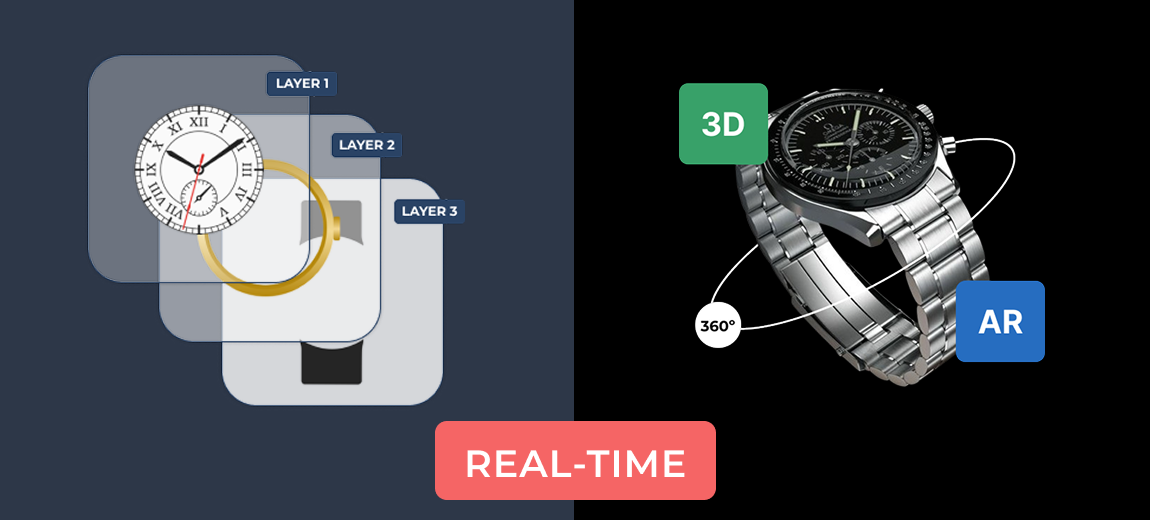
A product configurator is a visual, often interactive tool that lets customers personalize and preview a product in real time.
Instead of filling out form fields, users can choose options and immediately see the changes applied to an image or 3D model.
Used for:
- Building configurable products (e.g., sofas, bicycles, PCs)
- Real-time visual customization (colors, components, accessories)
- Conditional display for configuration options
- Upselling premium features visually
These configurator tools provide layered 2D previews or full 3D interactivity (via GLB models) to enhance customer experience and reduce uncertainty.

Key differences between extra product options and product configurators
| Feature | Extra product options | Product configurator |
| User interface | Form fields (dropdowns, checkboxes, inputs) | Visual, interactive (2D or 3D previews) |
| Customization preview | No visual preview | Real-time image or model updates |
| Complexity handling | Basic (limited conditional logic) | Advanced (multi-part logic, dependencies) |
| Setup time | Quick and easy | Longer (requires images or 3D models) |
| Customer experience | Functional, but not immersive | Engaging and realistic |
| Conversion impact | Moderate | High (especially for complex products) |
| Use case suitability | Simple product tweaks | Complex, build-your-own products |
| Mobile friendliness | High | High (modern tools use responsive viewers) |
| Integration with WooCommerce | Seamless | Seamless |
When to use extra product options:
Extra product options are best for:
- Basic personalization (names, notes, gift options)
- Add-on services and upsells
- Simple variant extensions without needing full variations
- Products that don’t require visual feedback
Example use cases:
- Add warranty or support options to electronics
- Offer toppings or ingredients in food products
- Simple engraving on jewelry
When to use a product configurator:
Product configurators are ideal for:
- Complex products with multiple customizable components
- Products where visual feedback is crucial
- Brands offering “build-your-own” experiences
- Stores looking to stand out with immersive shopping
Example use cases:
- Custom bicycles, skateboards, or PCs
- Watches or rings with changeable parts
- Uniforms with personalized color zones
Combine both for maximum impact
The WCB Configurator Builder let you combine visual configuration with form-based add-ons, allowing you to:
- Offer visual customization (2D or 3D)
- Let users input custom text
- Add optional extras like warranty, express shipping, or accessories
This hybrid approach gives you the best of both worlds: visual engagement AND functional upselling.
Conversion benefits
| Benefit | Extra product options | Product configurator |
| Reduces abandoned carts | ✅ | ✅ |
| Improves user experience | ✅ | ✅ |
| Boosts average order value | ✅ | ✅ |
| Supports complex personalization | ❌ | ✅ |
| Ideal for mobile | ✅ | ✅ |
| Adds visual clarity | ❌ | ✅ |
Conclusion: choose based on your product complexity
The right solution depends on your product catalog, customer expectations, and marketing goals:
- Use extra product options for quick and easy enhancements to simple products.
- Choose a product configurator for more immersive, high-value products that benefit from visual feedback and component selection.
Start with extra product options and upgrade to a product configurator as your product offerings grow, or combine both for maximum flexibility.
FAQ
Are product configurators harder to set up?
Product configurators take more time to set up (especially 3D), but offer a significantly better user experience and ROI over time.
Is WCB compatible with Elementor or Gutenberg?
Yes, WCB works with both. You can insert configurator products on any page or template. Or transform WooCommerce pages by linking the configuration to a WooCommerce product.
Does the plugin have a limit on amount of configurations?
No, the plugin does not have limit on amount of configurations you can create. You can create unlimited amount of configurations in WordPress.
How many options can I add for each choice?
Depends on your server speed, but we are confident the plugin handles up to 50 attribute options per choice (or more). There is practically no limit to the amount of options you can add.
Will this work with variable products?
Yes you can extend WooCommerce variations with custom options as well. But WCB can also replace the need for WooCommerce’s built-in variations by giving you full control through our own option system.