
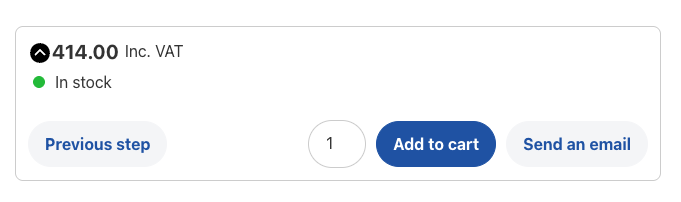
Show second configuration button
This add-on enables you to add a secondary configuration action to your configuration forms.
For example, you can have an add to cart button and a request a quote button displayed next to each other.
Your customer can choose to request quote or add the product directly to cart if he is confident of the product. This is a great way to boost your conversion rates.
View demo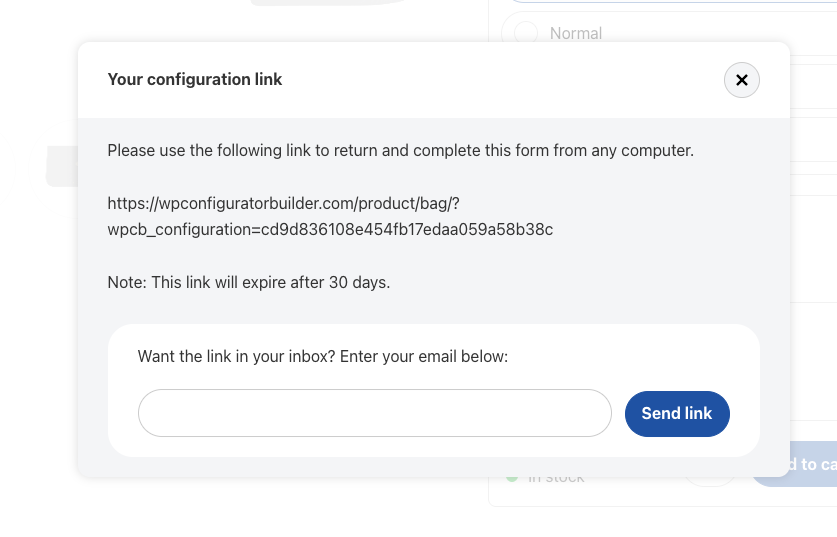
Save and continue
Don’t leave potential customers hanging. By allowing customers to resume configurations later, you can give customers a second chance to complete their configuration.
You can even allow customers to send the link to their email, so they won’t forget it easily.
View demo
Download PDF file
You can also allow customers to download configuration as a PDF file, so they can reach out to you later.
The PDF contains all the configuration details you need to know, including images, configuration options, skus, pricings and even a link to the online configuration page.
View demo
Add configurations to wishlist
You can also enable the wishlist feature with this add-on. This is an in-browser wishlist where the customer can store his favorite configurations, which can be accessed and customized later on.
You don’t need to have WooCommerce installed. The wishlist is a standalone feature and not registered to the WooCommerce account section.
View demo
Save configuration popup notice on leave
Finally, this add-on allows you to show a popup notice when the customer is trying to leave the page.
This could help saving more configurations and increasing sales later on.


Form actions
Choose the plan that fits you best
Personal
$49/annual
$149/once
- Install on 1 site
- 12 month updates and support
- 14-day moneyback guarantee
Plus
$99/annual
$249/once
- Install on 5 sites
- 12 month updates and support
- 14-day moneyback guarantee
Power
$199/annual
$499/once
- Install on 25 sites
- 12 month updates and support
- 14-day moneyback guarantee
Get all add-ons at once and save over 60%!
Get instant access to all our current and future add-ons with our bundle deal